Bootstrap 00: I been hacked, all my bits gone
2024-09-18
It’s early 1975, you got this new “Altair 8800 Computer”. Unlike later home computers, it comes with no software at all. No OS, no BIOS, no BASIC, no monitor ROM. What can you do with it? Would you be able to build some sort of OS from nothing? In this series we will go back to the old days of computing, when you could (and sometimes had to) write machine code by toggling bits of memory using front panel switches.
1 Bootstrapping
This blog is inspired by the blog of compiler crime on bootstrapping. I saw it for the first time around June of 2023 when I was researching Forth systems and how they are implemented. I will talk about the same topic but taking a broader approach and not focusing exclusively on Forth. In their blog, the underlying question is given an IBM PC with no software (except the BIOS), what is the minimal piece of code that would have to be loaded in to be able to go back to a comfortable environment without any external interaction?
I’m basing this blog on the Altair 8800 instead. Unlike the IBM PC (and most computers after 1975 for that matter), it has a front panel with switches for manual debugging and poking around memory. This is great because no software has to be magically preloaded, bootstrapping can be started at a lower level. Just looking for a minimal bootstrap code to toggle in would be boring, so I will be documenting the whole process, from nothing to that yet-to-be-defined comfy environment.
Ideally, this environment would have a programming language, a text editor and a file system. For example a Lisp, a Forth or a DOS with an assembler. It would be interesting to look at multitasking as an extra challenge at the end.
2 The Aquila 8800
I have always been fascinated with airplane and spacecraft cockpits, power plant control rooms and places with a lot of switches. At some point I tried (and failed) to build a home simulator for the Mercury capsule. In January of 2023, I became obsessed with the Altair 8800. Original Altairs are really expensive, I found out about the Altair Clone and the cheaper Altair-duino kit but figured I could build my own “replica” since I like to tinker.
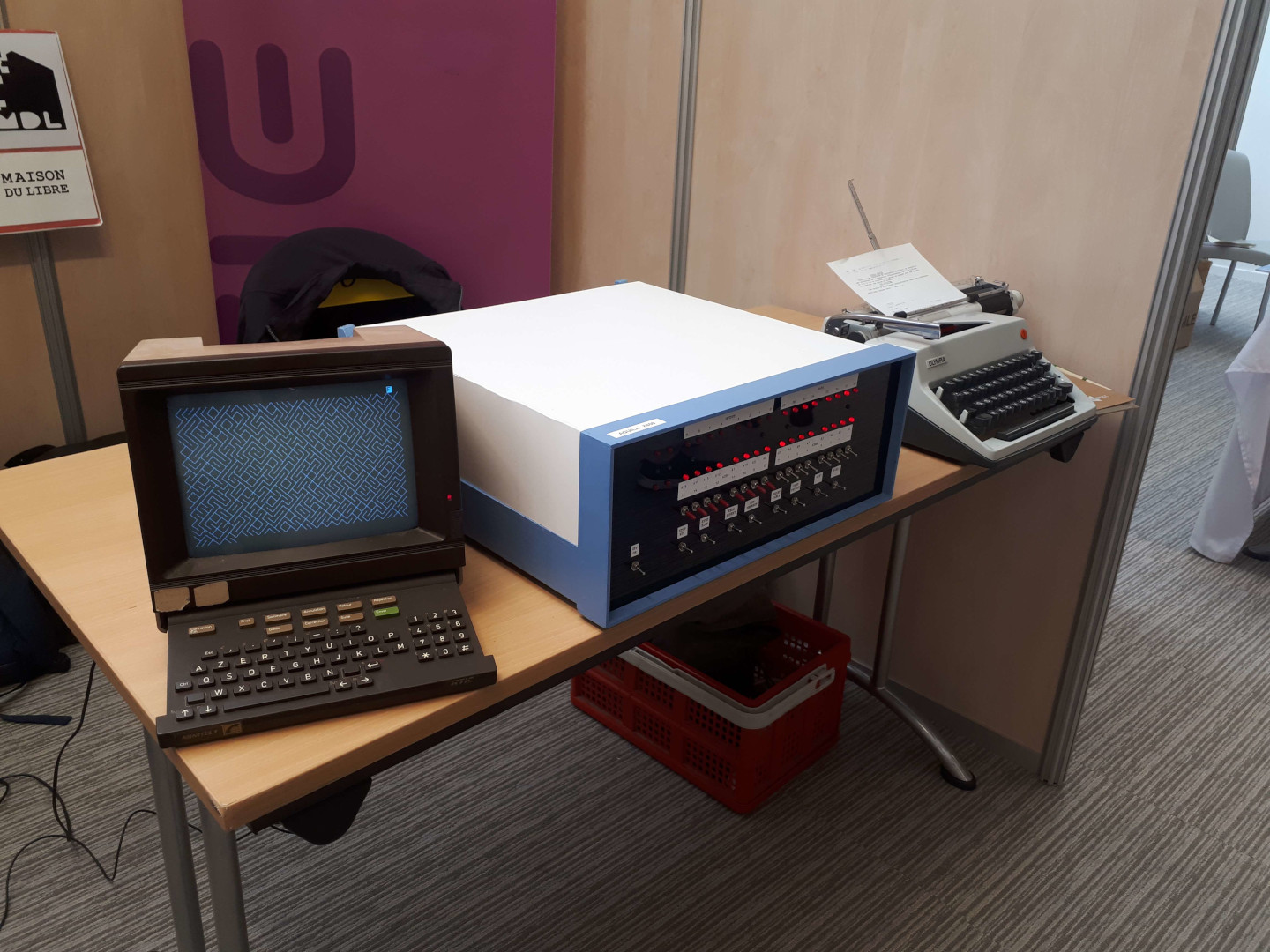
I made my own emulator and ported it to the Arduino Mega but it couldn’t emulate more than 4K of RAM. Fortunately it’s just enough to run 4K BASIC. Turns out the Altair-duino uses the ARM-based Arduino Due instead of the more usual AVR ones like the Mega. I switched to the Pi Pico and built a full-scale case and a front panel with actual toggle switches instead of push buttons. Because it’s a loose replica, I call it the Aquila, the constellation in which the Altair star resides.
Any PC can be used as a serial terminal through USB but at some point I went on a side quest because I wanted to use a Minitel for that purpose as well. The Minitel is a piece of French tech that originated in the 80’s, it’s basically a dumb terminal with a modem to access text services via the phone network. It conveniently has a serial port and a VT100 ASCII mode. The Minitel was ubiquitous in France but nowadays it has no functional value and doesn’t have collector status yet. You can find some for free if you know where to look.
I recently added floppy disk drive emulation and a SD card reader to store disk images, I can now boot CP/M. In the future I would like to create an interface for actual disk drives. I also plan on making (or finding) a punched tape reader, by the way Usagi Electric just uploaded two videos on that topic. I go to conventions with the Aquila and talk about what we really mean by “computers work with 1s and 0s”, the front panel and serial cable are great but being able to look at the bits on paper tape would definitely add to that. For now I can use the SD card to store emulated tapes.
As of September 2025 I also completed the audio modem to interface with a cassette recorder.
3 The rules
They’re more like loose principles to make it fun for me. As stated, the challenge is to start from zero and end up with some sort of operating system. If I overcomplicate something for seemingly no reason it’s likely because I’m having fun doing it.
- I cannot use any pre-existing software. I can do research and read manuals and papers but I’ll try not to look at too much code because I would like to solve the details by myself.
- I cannot use my PC for compilation or debugging. I cannot transfer data from my PC to the computer except a backup if I loose data. For serial communication I have to use the Minitel. Because I use my PC to write this blog, I can transfer in the other direction to show you what I wrote and also for backups, but not to debug memory dumps though.
- I can improve the emulator at any time, for instance by adding bank switching if 64K is not enough. At some point I’ll allow myself a small ROM so I don’t have to toggle in a bootloader every time I boot.
4 The plan
At the time I’m writing this article I haven’t started yet. I see two potential routes: the Lisp/Forth self bootstrapping language one and the more mainstream DOS one. I have some experience with the first since I once bootstrapped a Forth from x86 assembly and I read a lot of old Lisp papers when I was bored last year. It also seems a lot more fun because I won’t be staying in assembly for a long time. In both cases, an efficient way to write code is required. A piece of paper and an hex editor would suffice but in this case I think it would be more interesting and worth the effort of writing a small text editor for the ability to comment code and not having to retype everything twice.
Here’s how I think it will start:
- Design a loader that can read binary from terminal or tape (same with a dumper), it will have to be toggled in using the front panel.
- Write a monitor program that does the front panel functions and some more, and save it to tape, the Minitel can’t send binary so it will have to be loaded with the front panel once and then the loader can be used next time.
- Extend the monitor to edit text and write ASCII to memory, this time it can be written using the monitor.
- A really basic assembler, it can be an monitor extension to read
text commands from memory or a reverse hex dump (
xxd -r), it just needs to handle comments.
At this point I can go with:
- A bootstrap programming system written in hex, a minimal Forth or Lisp.
- Expand that system in its own language, add routines for IO, math, memory management, strings, …
- Floppy disk block functions.
- A file system.
- A text file editor.
- (optional) Figure out how to implement multi-tasking with these languages.
And the alternative route:
- A better assembler because I don’t want to be stuck in hex for a long time.
- A set of shared routines for IO, math, memory management, strings, …
- Floppy disk block functions to the monitor.
- A file system.
- Executable files and a way to run them from the monitor, at some point the monitor will be more akin to a shell.
- A text file editor.
- A compiler for a higher level language.
- (optional) Relocatable executables, multi-tasking, inter-process communication…